
Operations
Find the Databricks workspaces Microsoft upgraded to Premium for you
Azure retired the Standard tier on October 1 and moved every leftover workspace up a tier. How to find yours, price the change, and decide what to do with it.
The Cloud Practice2 min readOperations
Ten days ago Microsoft finished something it announced a year earlier. Every Azure Databricks workspace still on the Standard tier on October 1 was upgraded to Premium automatically. New Standard workspaces have been impossible to create since April. The tier is gone.
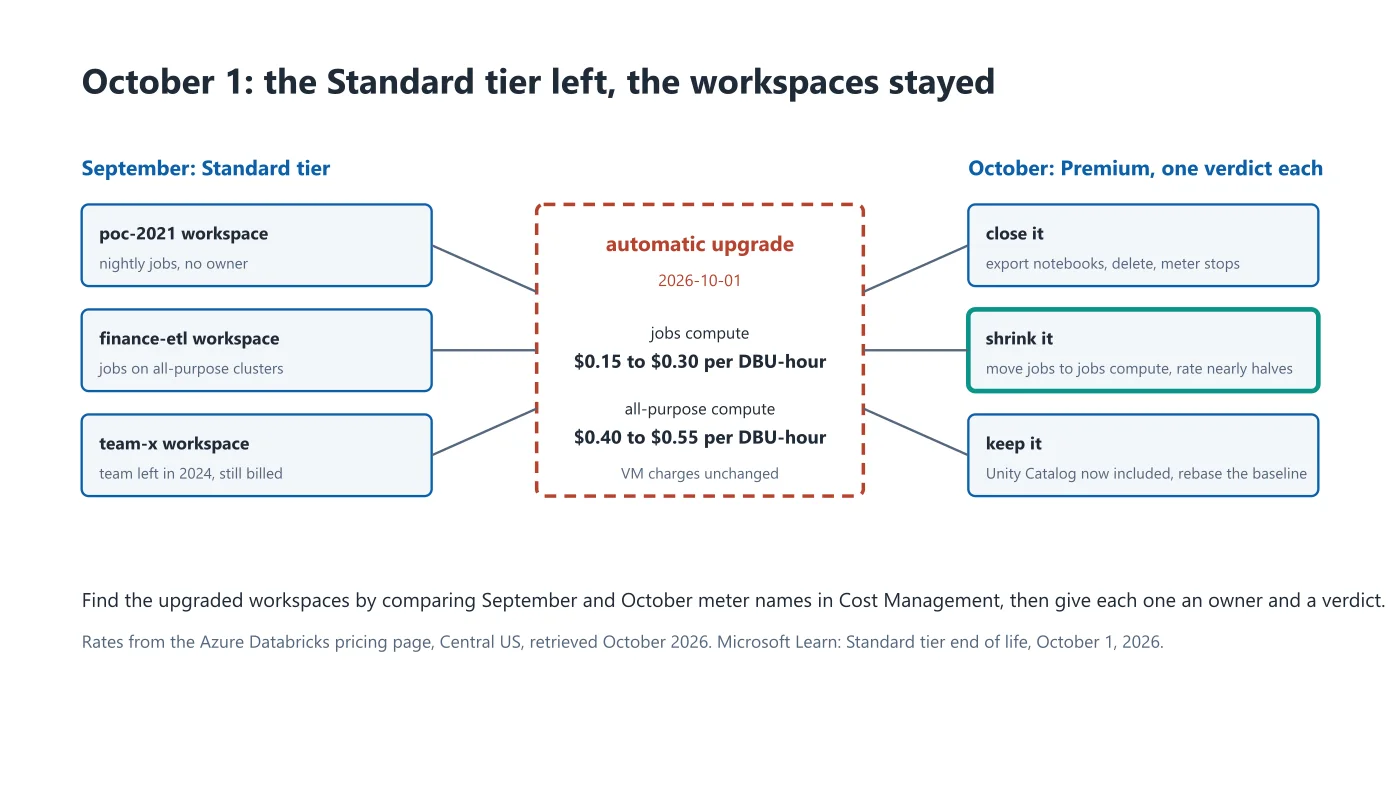
Nothing broke, which is why this guide exists. Notebooks, users and cluster definitions carried over. The jobs kept running. The only artefact is the October invoice, and that arrives in November.
What changed on the bill
The Premium rate for a Databricks unit is higher for every compute type. On the Azure pricing page for Central US, as of this week, jobs compute goes from $0.15 to $0.30 per DBU-hour and all-purpose compute from $0.40 to $0.55. The virtual machines underneath cost what they always cost. So a workspace that ran scheduled jobs and little else just saw its Databricks line double, while the VM line held still and the total moved by whatever ratio the two had.
Not a disaster. A line item that changed shape without anyone touching it, which is the kind finance notices in Q1 and asks about in a tone.
Finding them
The account console lists every workspace with its tier on the Workspaces page. That tells you what you have now, which is Premium, everywhere. It does not tell you which ones were Standard a fortnight ago.
For that, use the September bill. In Cost Management, group Azure Databricks charges by meter for September and again for October to date. Standard-tier meters have Standard in the name; any resource whose meters flipped names between the two months is a workspace that was upgraded for you. Export the list. It is usually short, and it is usually the forgotten ones: a 2021 proof of concept, a team that left, a nightly job nobody remembers scheduling.
Give each one an owner and a one-line verdict.
Three verdicts
Keep it. The workspace does real work, and Premium brings Unity Catalog, serverless SQL and the governance features the Standard tier lacked. If you were planning a catalog rollout anyway, the upgrade removed a prerequisite. Fold the rate change into the baseline, as we have argued before, and move on.
Shrink it. The workspace exists to run jobs. If those jobs run on all-purpose clusters out of habit, moving them to jobs compute cuts the DBU rate by nearly half even at Premium prices, which more than pays back the tier change. One afternoon of cluster policy.
Close it. Nothing has run in ninety days. Export the notebooks to the repository where they should have lived, delete the workspace, and let the meter stop.
The note for the calendar
Microsoft published the retirement date in 2025. The people who did the work in advance chose their own week for it, tested the upgrade on one workspace first, and had the cost conversation before the invoice forced it. Everyone else is reading this guide. A tier retirement is a calendar entry with a price, and the cloud providers publish theirs well ahead. Half a day a quarter reading them is the cheapest cost control we know.